Network Illustrations (Plan A)
The two working drawings for the networking part — live-editable. The
.drawio files in Illustrations/Networking/ ARE these images: edit in drawio
desktop, save, run Update Images.sh in the project folder (right-click →
Run as a Program), refresh this page — done. Sound and Visuals sets will work the same way.
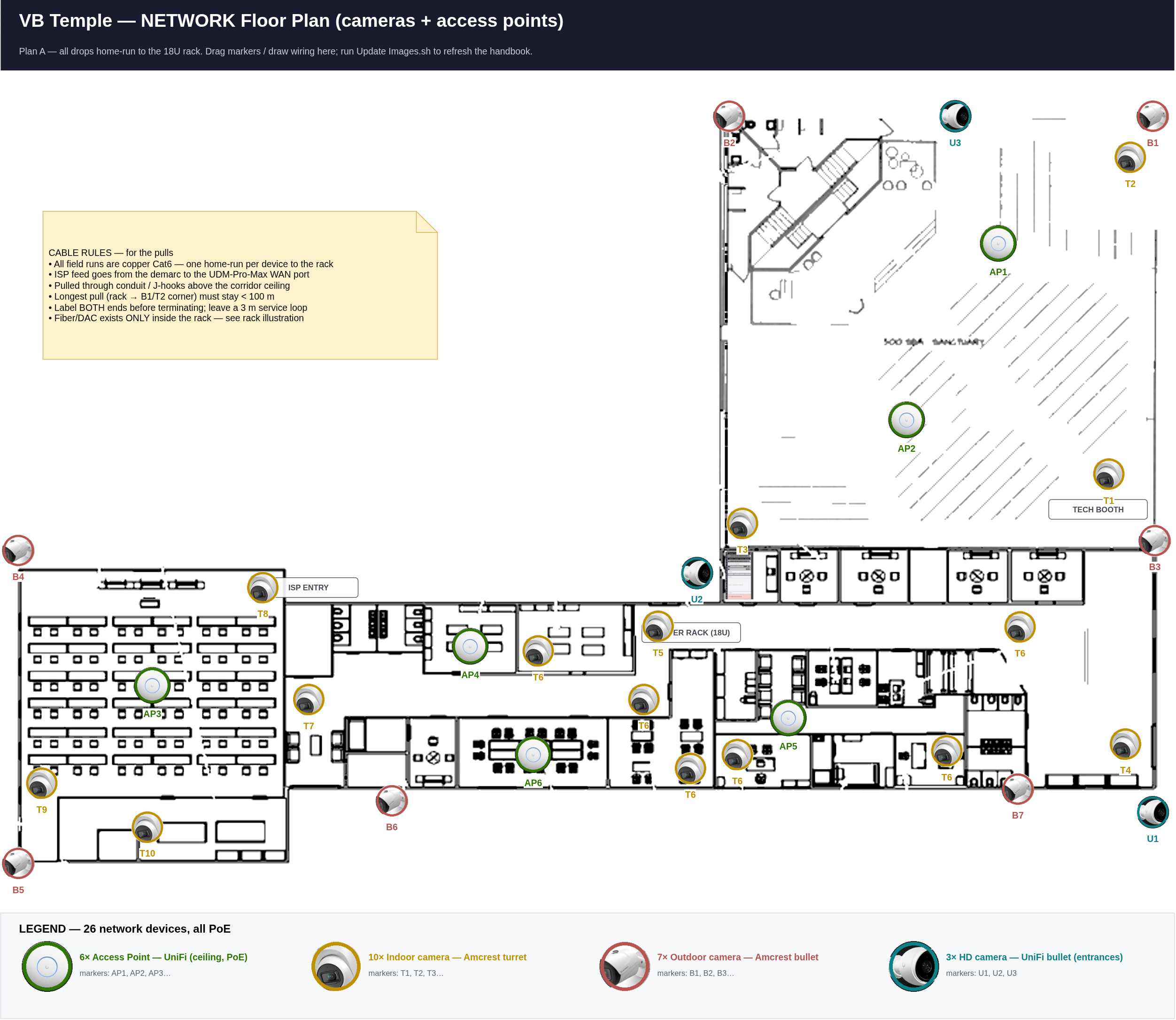
Floor plan — 26 devices + cable runs
20 security cameras and 6 access points as photo badges. The small rack graphic at the corridor–sanctuary junction marks the 18U rack — every run ends there. All field runs are copper Cat6, one home-run per device (rules in the on-image box). Wiring routes are drawn by Xavier directly in the .drawio file.
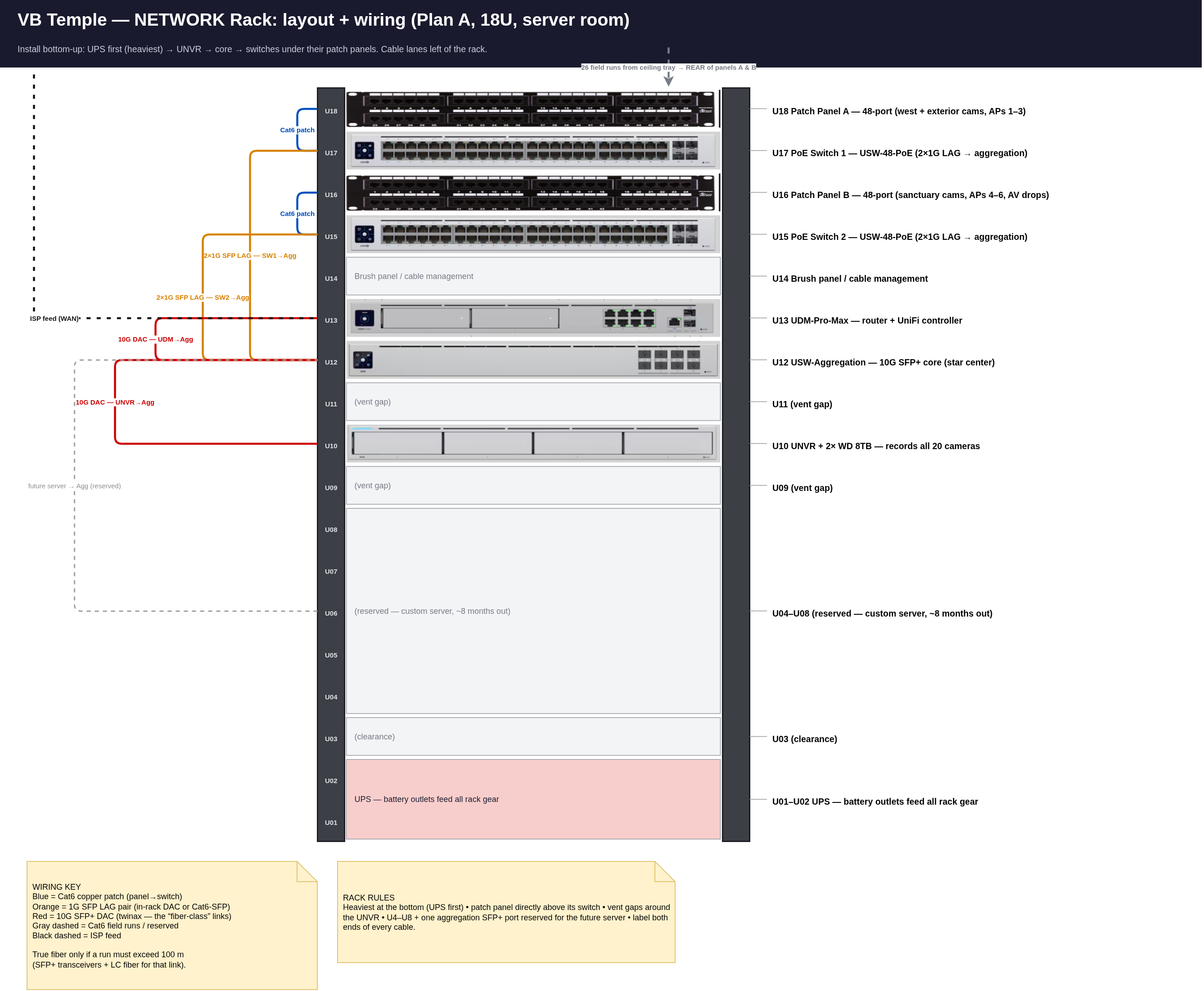
Rack — layout + wiring
The 18U rack with the real device photos in their slots. Cable lanes left of the rack: blue Cat6 patch (panel→switch), orange 2×1G SFP LAG pairs, red 10G SFP+ DACs, black dashed ISP feed, gray dashed field runs / reserved future-server link.
Networking TODO — live copy
Live copy of TODO - Networking.md (synced 2026-09-12 18:17). Tick right here — this browser remembers your ticks, even across syncs. The Copy-ticks button turns them into Markdown for the .md file / for Gary.
TODO — Networking (Plan A, centralized)
Everything home-runs to the 18U rack in the server room. Companion images:
Illustrations/Networking/Network_Rack_18U.png and Network_Floorplan.png.
Golden rule: star topology only — switches never connect to each other or to the UDM.
0 · Before anything ships/starts
Skills needed: Purchasing & quotes · floor-plan reading · careful measuring
- Order the missing items: rackmount UPS, 4× 1G SFP modules (2 per LAG, both ends already counted? verify: each LAG = 2 SFP at the switch + 2 SFP ports at the aggregation), 2× 10G DAC cables (UDM→agg, UNVR→agg)
- Confirm UDM-Pro-Max delivery (Xavier)
- UniFi PTZ camera — Xavier says this counts as Networking, but it is **not on the Networking Order sheet**. Confirm model/purchase, then Gary adds it to the floor plan
- Measure the longest run: server room → sanctuary far corners (B1/T2 markers). Must be < 100 m / 328 ft including patch cables — if over, re-route or move the device
- Decide static-IP ranges: cameras, APs, switches (write them in this file when chosen)
1 · Rack & power (Network_Rack_18U.png)
Skills needed: Hand tools · rack assembly · two-person lifting · power-strip/outlet safety
- Assemble 18U rack; verify depth against the deepest device (UDM-Pro-Max)
- Install bottom-up: U1–2 UPS → U10 UNVR (+ both WD 8TB drives seated) → U12 aggregation → U13 UDM → U15/U17 switches → U16/U18 patch panels → U14 brush panel
- Leave U4–U8 empty — reserved for the custom server (~8 months)
- All rack gear into the UPS battery-backed outlets
- Power on UDM → run setup → adopt aggregation + both switches + UNVR
2 · Controller config — BEFORE any LAG cables
Skills needed: UniFi controller · IP networking basics (VLAN/DHCP)
- Create the two Aggregate (LAG) port profiles for the client-switch pairs
- Define the UDM uplink port profile
- Create VLANs: staff (one VLAN, includes future-server port), cameras, guest Wi-Fi
- Enable storm control on all client-facing ports; confirm RSTP is active
3 · Core cabling
Skills needed: SFP/DAC module handling · cable dressing · labeling discipline
- UDM-Pro-Max →10G DAC→ USW-Aggregation
- UNVR →10G DAC→ USW-Aggregation
- Switch 1 →2×1G LAG (SFP both ends)→ aggregation
- Switch 2 →2×1G LAG (SFP both ends)→ aggregation
- Verify: both LAGs show 2 active members; UNVR links at 10G; keep one agg SFP+ port free (future server)
4 · Structured cabling (Network_Floorplan.png)
Skills needed: Ladder safety · cable pulling/fishing · keystone punch-down · cable tester use
- Pull drops for 26 devices (6 AP, 10 turret, 7 outdoor bullet, 3 UniFi bullet) along the routes according to the
Network Floor Plan Diagram— label both ends of every run - Terminate keystones → patch panels: Panel A = west/exterior cams + APs 1–3, Panel B = sanctuary cams + APs 4–6 + AV drops
- Cable-test every drop before mounting any device
- Patch panel port map written and taped inside the rack door (Gary can make a template)
5 · Access points (6)
Skills needed: Drill & ceiling anchors · UniFi adoption · Wi-Fi walk-testing
- Mount per floor plan: AP1 sanctuary front · AP2 sanctuary rear · AP3 fellowship hall · AP4 corridor west · AP5 corridor east · AP6 lobby/lounge
- Adopt in UniFi; staff SSID → staff VLAN, guest SSID → isolated guest VLAN
- Walk-test signal in sanctuary, fellowship hall, offices, kitchen
6 · Cameras (20)
Skills needed: Ladder & exterior mounting · weather sealing · camera aiming · IP/ONVIF setup
- Update UNVR to Protect 5.0+ first (needed for ONVIF)
- Mount + adopt 3 UniFi bullets (U1–U3, main entrances) into Protect
- Amcrest (10 turret + 7 bullet): set static IP + new password on each, then add to Protect via ONVIF
- Aim/focus every camera; check day AND night views
- Confirm all 20 recording; retention days meet target; motion zones set on entrances
7 · Sign-off
Skills needed: Documentation · UniFi controller · speed testing
- Every LAG: 2 active members · UNVR at 10G · no controller alerts
- Speed test on staff Wi-Fi + wired staff port
- Back up the UniFi controller configuration (download + store off-site)
- Photograph the finished rack + patch panels for the records
- Hand the techs
Tech Handbook.html(service-day + maintenance sections now apply)
Done items: tick the box and add a date. Problems/changes: log them in Garys Notes.md.