Visuals Floor Plan — a working surface, not a finished drawing
This plan ships blank on purpose. Every screen sits in a parts bin under the plan; drag each one onto the wall or ceiling it goes on. Whatever the drawio shows is what the handbook shows.
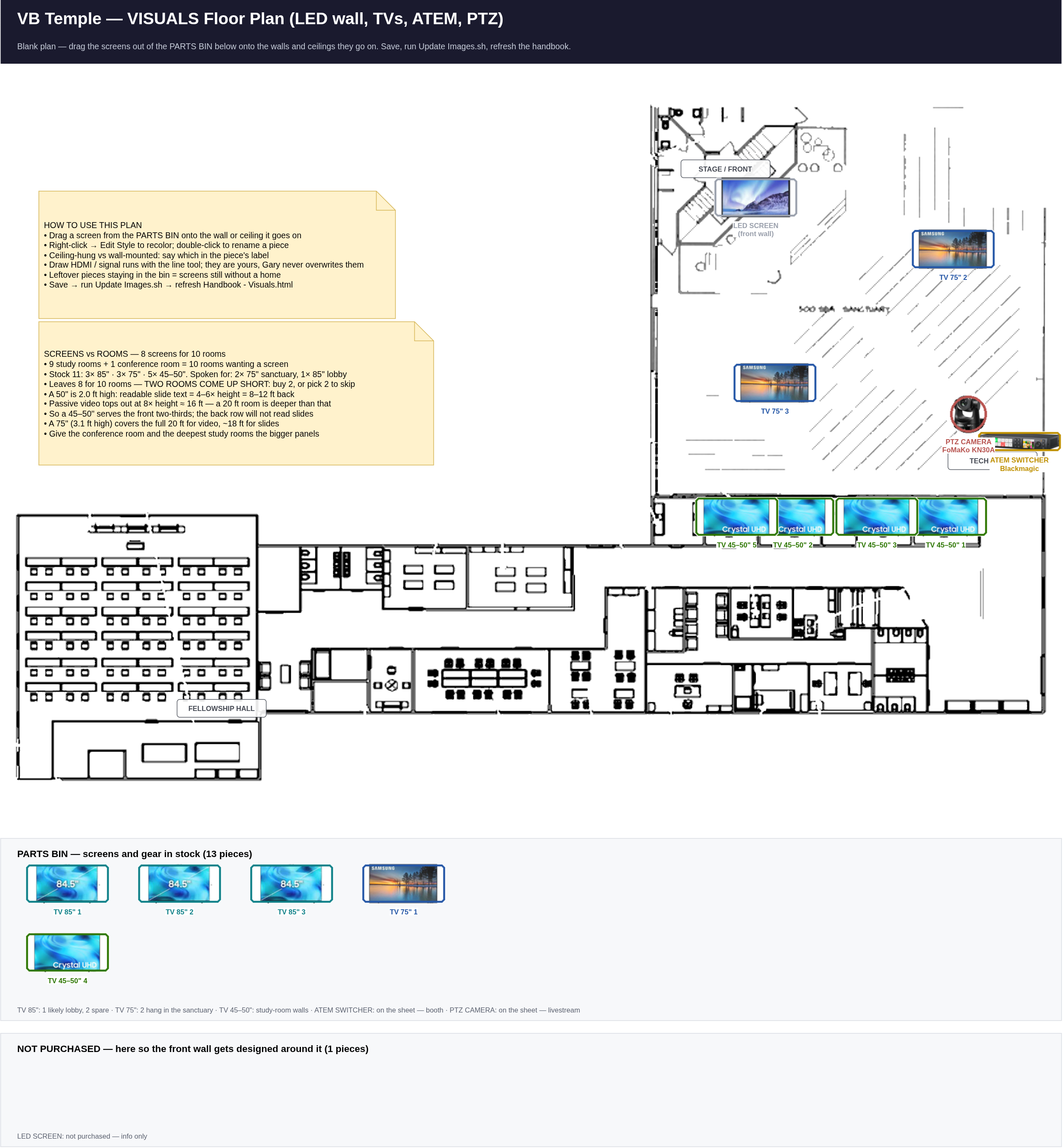
Editable twin:
Illustrations/Visuals/Visuals_Floorplan.drawio — open it in
drawio, move the pieces, save, then run
Update Images.sh and refresh this page.
Screen stock — already owned, not on any order sheet
| Screen | In stock | Where it goes |
|---|---|---|
| 85" | 3 | 1 likely the lobby; the other 2 are spare — the conference room and the deepest study rooms are the obvious candidates |
| 75" | 3 | 2 hang from the sanctuary ceiling; the third is unassigned |
| 45–50" | 5 | Study-room walls (rooms are ~12 ft × 20 ft) |
| LED screen, front wall | 0 | Not purchased, not on any list — carried as an info-only piece so the front wall gets designed around it |
Plus the two items that are on the Sanctuary sheet: the Blackmagic ATEM switcher (tech booth) and the FoMaKo KN30A PTZ camera (livestream). That makes 13 pieces in the bin.
Product photos make the pieces look real
Drop photos into Pictures/Visuals/ using the filenames listed in that folder's
README.txt, then run
python3 "Garys Workshop/make_visuals_drawio.py". Each piece turns from a colored
box into a circular photo badge, same as the network markers.
make_visuals_drawio.py puts every piece back in the parts bin. Before it
does, it copies the current drawio to
Garys Workshop/backups/ with a timestamp and prints exactly which placed pieces
were reset, so a layout can always be recovered. Update Images.sh never
regenerates anything — run that as often as you like.Visuals TODO — live copy
Live copy of TODO - Visuals.md (synced 2026-09-12 18:17). Tick right here — this browser remembers your ticks, even across syncs. The Copy-ticks button turns them into Markdown for the .md file / for Gary.
TODO — Visuals (screens, LED wall, livestream)
Companion image: Illustrations/Visuals/Visuals_Floorplan.png — a blank plan with a parts bin.
Drag each screen onto the wall or ceiling it goes on, then run Update Images.sh.
Golden rule: no bracket goes into a wall until the plan says that screen belongs there.
Screen stock on hand
Already owned — not on either order sheet, so none of this costs budget.
- Confirm the count: 3× 85", 3× 75", 5× 45–50" — check the actual model and input types (HDMI count, ARC, CEC) on each before assigning it to a room
- Note which sets are smart TVs vs dumb panels — a smart TV in a study room needs a network drop and a VLAN decision (see the Networking plan)
0 · Decide the design (blocking everything else)
Skills needed: Floor-plan reading · sightline judgment · measuring
- Place all 13 parts-bin pieces on
Visuals_Floorplan.drawio. Anything left in the bin has no home yet — today that is 3× 85" and the third 75" - Mark which rooms on the plan are the 9 study rooms and the 1 conference room — the count is confirmed, but the plan tag
STUDY ROOMS?is still Gary's guess at where - Two rooms come up short. 10 rooms want a screen; after the sanctuary (2× 75") and the lobby (1× 85") only 8 screens are left. Either buy 2 more panels or pick the 2 rooms that go without for now
- Sanctuary: mark the 2× 75" as ceiling-hung and pick the two hang points — the congregation should see one without turning around
- Confirm the lobby 85" (Xavier: "we might") — that leaves 2× 85" and 1× 75" for rooms
- Give the conference room one of the bigger panels if it seats people deep
- Front wall: the LED screen is not purchased — size it and confirm it clears the stage, the PTZ camera's sightline and the ceiling-hung 75s
- Measure each room before mounting; a 12 ft × 20 ft study room seats its back row past the comfortable reading distance for a 50" (details on the plan)
1 · Structural mounting
Skills needed: Ladder safety · stud/joist finding · rigging & fall protection · torque sense
- Buy TV mounts — not on any list: wall mounts for the study rooms, and two ceiling mounts rated for a 75" for the sanctuary
- Weigh each set before ordering a mount; ceiling-hung 75s need the joist checked, not just the bracket rating
- Verify every mount point is structure, not drywall
- Ceiling-hung sets: safety cable in addition to the mount
- Check the tilt/viewing angle from the back of each room before final torque
2 · Signal & power
Skills needed: HDMI/HDBaseT runs · cable length limits · labeling discipline
- Plan each signal run: HDMI is unreliable past ~50 ft — use HDBaseT or fiber HDMI for the long pulls (booth → sanctuary ceiling, booth → study rooms)
- Power outlet behind every screen position — add one where there is none
- Label both ends of every signal run
- Network drop for any smart TV / signage player (coordinate with the Networking pulls so it happens in the same ceiling trip)
3 · Livestream chain
Skills needed: ATEM operation · PTZ control · streaming setup · audio-follows-video
- Mount the FoMaKo KN30A PTZ where it sees the stage without the ceiling-hung 75s or the LED wall blocking it
- ATEM Switcher in the tech booth; confirm its inputs cover PTZ + slides + any spare
- Feed audio from the sound mixer into the ATEM — livestream sound comes from the board, not a camera mic
- Set up the streaming destination and do a full private test service before going live
4 · Sign-off
Skills needed: Documentation · training
- Every screen powers on and shows the right source from the booth
- Label the input each screen expects; tape a copy inside the booth
- Photograph every mount and the booth for the records
- Train at least 2 volunteers on the ATEM, the PTZ presets and the stream start/stop
Done items: tick the box and add a date. Problems/changes: log them in Garys Notes.md.