Sound Floor Plan — a working surface, not a finished drawing
This plan ships blank on purpose. Every product sits in a parts bin under the plan; drag each piece to where it actually goes. Whatever the drawio shows is what the handbook shows.
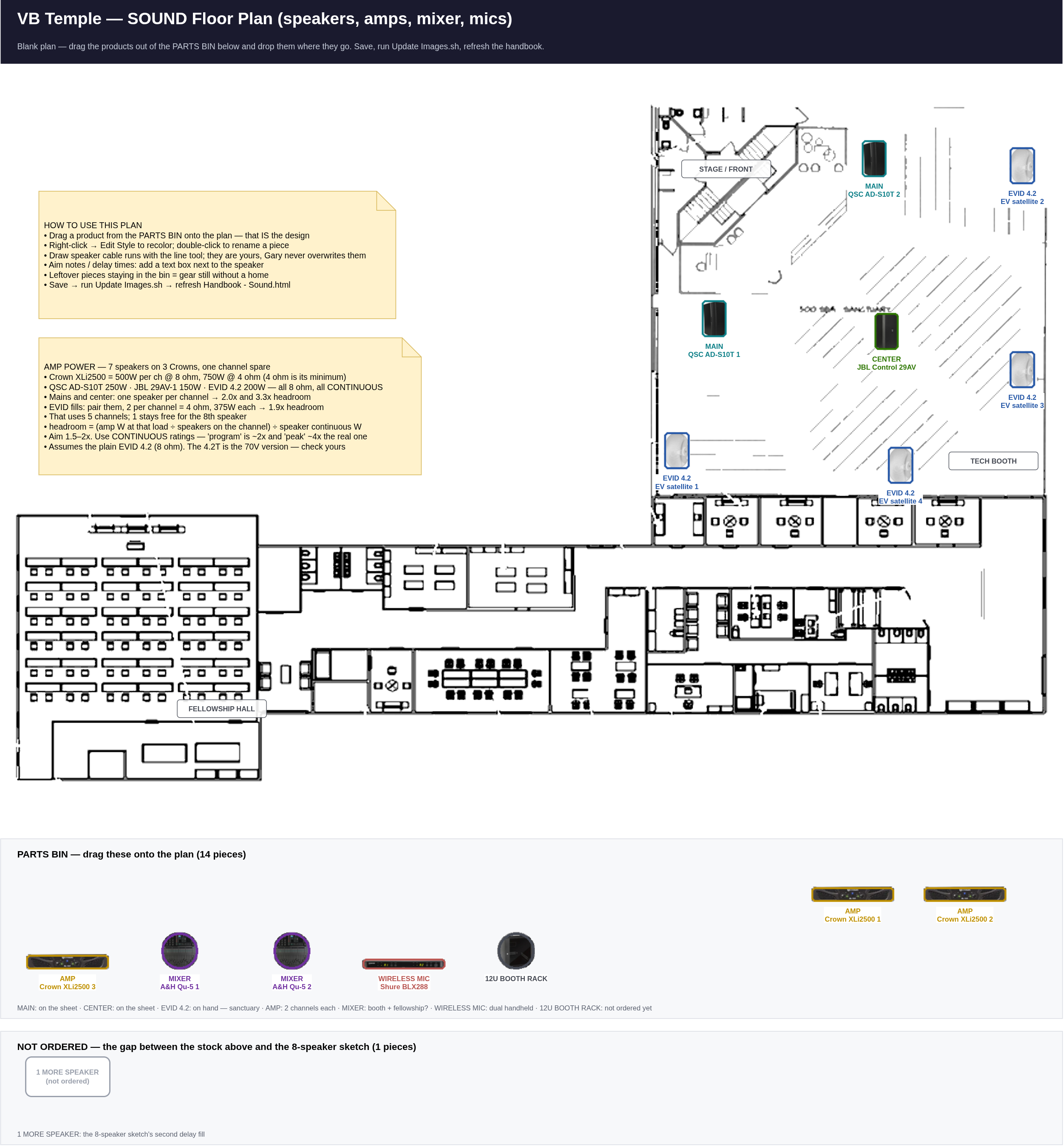
Editable twin:
Illustrations/Sound/Sound_Floorplan.drawio — open it in
drawio, move the pieces, save, then run
Update Images.sh and refresh this page.
Amp power vs speaker power — how to check it
Before committing a speaker to an amp channel, run these five steps. The whole point is headroom: an amp with room to spare stays clean, while an amp that runs out of power clips, and clipping is what actually destroys tweeters. Under-powering kills more speakers than over-powering does.
- Find the speaker's continuous rating. Not "program", not "peak".
- Work out the load the amp will see. One speaker = its own impedance.
Identical speakers wired in parallel:
load = speaker impedance ÷ number of
        speakers
. Two 8 Ω in parallel = 4 Ω. - Read the amp's power at that impedance — amps make more power into a lower load, so the number changes with what you hang on it.
- Divide it up:
headroom = (amp watts at that load ÷ speakers on the channel) ÷ speaker continuous watts - Aim for 1.5–2×. Below 1× the amp will clip before the speaker is working hard. Above about 3× is safe but easy to abuse — set the gain so you cannot push past the speaker's rating.
The numbers for this build
| Item | Impedance | Continuous power | Note |
|---|---|---|---|
| Crown XLi2500 (×3 = 6 channels) | — | 500 W per ch @ 8 Ω 750 W per ch @ 4 Ω |
1500 W bridged @ 8 Ω. 4 Ω is its minimum stereo load |
| QSC AD-S10T (main L/R) | 8 Ω | 250 W | also has 70V/100V taps + 8 Ω bypass |
| JBL Control 29AV-1 (center) | 8 Ω | 150 W | 300 W figure is program, not continuous |
| EV EVID 4.2 (×4, on hand) | 8 Ω (6 Ω min) | 200 W | the plain 4.2 is 8 Ω; the 4.2T is the 70V version |
Worked example — all 7 speakers on the 3 Crowns
Running everything at 8 Ω, with the EVID fills paired two-to-a-channel:
| Amp / channel | Drives | Load | Amp gives | Per speaker | Headroom |
|---|---|---|---|---|---|
| Amp 1 — A | QSC main L | 8 Ω | 500 W | 500 W | 2.0× ✓ |
| Amp 1 — B | QSC main R | 8 Ω | 500 W | 500 W | 2.0× ✓ |
| Amp 2 — A | JBL 29AV center | 8 Ω | 500 W | 500 W | 3.3× — fine, but set gain carefully |
| Amp 2 — B | EVID 1 + 2 in parallel | 4 Ω | 750 W | 375 W | 1.9× ✓ |
| Amp 3 — A | EVID 3 + 4 in parallel | 4 Ω | 750 W | 375 W | 1.9× ✓ |
| Amp 3 — B | spare | — | — | — | free for the 8th speaker |
The three amps comfortably cover all seven speakers, and one channel is still free — enough for the eighth speaker if the distributed layout gets built. Every load is 4 Ω or 8 Ω, so nothing goes below the XLi2500's 4 Ω minimum.
If you ever go 70V instead
All three speaker models can run on a 70V/100V distributed line. That maths is different and much simpler: set each speaker's transformer tap, add the taps up, and the amp's 70V output must be at least 1.2× that total (20% headroom). A dozen speakers tapped at 25 W = 300 W, so you would want a 70V amp of 360 W or more.
Product photos make the pieces look real
Drop photos into Pictures/Sound/ using the filenames listed in that folder's
README.txt, then run
python3 "Garys Workshop/make_sound_drawio.py". Each piece turns from a colored box
into a circular photo badge, same as the network markers. Until then the boxes work fine.
make_sound_drawio.py puts every piece back in the parts bin. Before it
does, it copies the current drawio to
Garys Workshop/backups/ with a timestamp and prints exactly which placed pieces
were reset, so a layout can always be recovered. Update Images.sh never
regenerates anything — run that as often as you like.Reference sketch (not the plan of record)
Illustrations/Sound/Speakers arrangment.png sketches an 8-speaker distributed
system — 4× JBL Control 29AV plus 4× EV EVID satellites with a delay matrix.
Only 3 speakers are on the order sheet, so treat it as an option to evaluate, not the design.
The sketch also labels its matrix outputs SQ-5; the sheet buys the
Allen & Heath Qu-5, which is what the parts bin says.
Sound TODO — live copy
Live copy of TODO - Sound.md (synced 2026-09-12 18:17). Tick right here — this browser remembers your ticks, even across syncs. The Copy-ticks button turns them into Markdown for the .md file / for Gary.
TODO — Sound (sanctuary first, fellowship hall later)
Companion image: Illustrations/Sound/Sound_Floorplan.png — a blank plan with a parts bin.
Drag each product where it really goes, then run Update Images.sh.
Golden rule: nothing gets mounted until the speaker positions on that plan are final.
0 · Decide the design (blocking everything else)
Skills needed: Floor-plan reading · basic room acoustics · budget math
- Place all 14 parts-bin pieces on
Sound_Floorplan.drawio— mains, center, the 4 EVIDs, amps, mixers, wireless mic, booth rack. Anything left in the bin has no home yet - Decide: 3 speakers (as ordered) or the 8-speaker distributed layout sketched in
Illustrations/Sound/Speakers arrangment.png. With the 4 EVID 4.2 on hand that sketch is now 7 of 8 covered (2× QSC mains + 1× JBL 29AV + 4× EVID) — only one speaker short - Confirm the EVID model: plain 4.2 or 4.2T? The plain 4.2 is 8 ohm / 200 W and the power plan in the handbook assumes it. A 4.2T is the 70V version, which the Crown XLi2500 cannot drive at all — that would mean different amplifiers
- Decide where mixer 2 lives — the sheet buys 2× Allen & Heath Qu-5 and the fellowship hall is a later phase, so the second board has no room yet
- Amp channels: the maths is done — see Amp power vs speaker power in the handbook. 3× XLi2500 covers all 7 speakers on 5 of 6 channels with 1.9–2.0× headroom, pairing the EVIDs two-to-a-channel (4 ohm). Re-run that calculation if any speaker changes
- Measure the longest speaker run (amp → farthest speaker) before buying cable
1 · Booth & rack
Skills needed: Rack assembly · power/outlet safety · heat & ventilation sense
- Buy the 12U booth rack (not on either sheet) — the 3 amps need a home
- Mount amps with a vent gap between them; amps run hot in a closed booth
- Mixer on the booth desk, not in the rack — the operator needs the surface
- Booth power: amps on their own circuit if possible; check the breaker before load
2 · Speaker mounting
Skills needed: Ladder safety · stud/joist finding · rigging & fall protection · torque sense
- Buy speaker mounting hardware + speaker cable (only XLR is on the sheet)
- Verify every mount point is structure, not drywall — a hung speaker is a safety item
- Mount mains L/R at the front, aimed at the back two-thirds of the seating
- Mount the center/front fill last, once the mains are aimed
- Safety cable every flown speaker regardless of bracket rating
3 · Cabling
Skills needed: XLR/speaker-cable termination · labeling discipline · cable dressing
- Pull speaker cable booth → each speaker; label both ends
- Pull XLR from stage boxes/wall plates → booth (Canare L-4E6S, 1000 ft on the sheet)
- Keep audio runs away from parallel mains power; cross at 90° where unavoidable
- Never share a conduit with the Cat6 camera/AP drops if it can be helped
4 · Power-on & tuning
Skills needed: Gain staging · mixer routing · SPL metering · feedback control
- Power sequence: mixer first, amps LAST (and off in reverse) — protects the drivers
- Set amp gains from the mixer's output, not the amp's front panel
- Ring out each mic for feedback; note the problem frequencies
- If the distributed layout is chosen: set delay times per speaker (rear speakers lag the mains by distance ÷ 1.13 ft/ms) and log the numbers in
Garys Notes.md - Walk the room during a real service-volume test — front, middle, back, under the balcony
5 · Sign-off
Skills needed: Documentation · mixer scene management · training
- Save a default mixer scene the team can always return to
- Back up the mixer show file to USB + off-site
- Photograph the booth, rack and every speaker mount for the records
- Label the mixer channel strip; tape a copy inside the booth
- Train at least 2 volunteers on the default scene and the power sequence
Done items: tick the box and add a date. Problems/changes: log them in Garys Notes.md.